How to Write Text-to-Video Prompts: 3 Real Examples | SheenCloud
How to Write Text-to-Video Prompts: 3 Real Examples
2026年11月20日·7 分钟·SheenCloud
How to Write Text-to-Video Prompts: 3 Real Examples
A good text-to-video prompt is one block of plain English: the scene first, then who is in it, what they do, how the camera moves, and what it sounds like. You don't need special software or code — you type the whole thing into the prompt box, and the video comes back.
Below are three real prompts I ran on SheenCloud, with the actual videos they produced, from the simplest to the most detailed. All three are 5 seconds at 480p, 100 credits each.
The 3 parts of a prompt
Every prompt in this guide has the same three parts, adapted from MiniMax's official prompt guide for its H3 video model. You paste all three into the text prompt box as plain text — no ComfyUI, no setup:
What you see — integrated_multimodal_description: the style, the subject, the place, the action, and the camera. Start with the overall scene, then walk through what happens, in order.
What you hear — overall_soundscape: the ambient sound and sound effects, in one or two sentences. Write N/A only if the clip is truly silent.
The music — non_diegetic_music: the score only. One or two sentences, or N/A if there is none.
Four rules that cover most of the guide:
Write in English. The model reads English prompts best. Dialogue goes in <d> tags (see case 2).
Say what should appear, not what shouldn't. There is no negative prompt here — instead of writing "no text on screen", describe the clean scene you want.
One timestamp per cut. When the shot changes, write the cut as an action with a single time, like "At 00:03.000 the camera cuts to…", not a range like "[3s–5s]".
New shot, new [Shot] number. Start a new shot when the subject, place, or viewpoint changes. A small camera move inside the same scene stays in the same shot.
Case 1: A product clip — two shots, one cut
The simplest useful prompt: one product, two shots, one camera move. This is the pattern to copy for any product video.
The full prompt:
integrated_multimodal_description: [Shot 1] Bright product photography style, a pair of clean white sneakers standing on a round light-grey pedestal against a soft white studio background, even soft lighting with a gentle shadow under the shoes. The camera holds a wide shot at shoe height, then slowly pushes in toward the sneakers over two seconds. At 00:03.000 the camera cuts to [Shot 2] a close-up of the right shoe, the white leather texture and neat laces filling the frame, the camera tilting up slowly along the laces as a thin white ribbon tied to the pedestal sways gently.

overall_soundscape: A quiet studio ambience with a faint air-conditioner hum and one soft click as the camera moves, then silence.

non_diegetic_music: N/A
What each part does:
[Shot 1] sets the scene in one sentence. Product, pedestal, background, lighting — everything the model needs to frame the shot is in the first two lines.
"Slowly pushes in" is the camera move. One verb phrase is enough; you don't need camera jargon. "Pushes in", "tilts up", "holds still" all work.
"At 00:03.000 the camera cuts to [Shot 2]" is the cut. One timestamp, written as an action. In a 5-second clip that leaves 3 seconds for the wide shot and 2 for the close-up.
The soundscape is one quiet sentence, and the music is N/A. A product clip doesn't need a score — saying so explicitly keeps the clip silent instead of adding random music.
What came back: the wide shot holds on the sneakers, the camera moves in, and at about 3 seconds it cuts to the lace close-up — the two shots in the prompt, in order.
Case 2: A scene with dialogue
One character, one spoken line. The trick is the dialogue format: the speaker gets an ID, and the spoken words go inside <d> tags.
The full prompt:
integrated_multimodal_description: [Shot 1] Warm morning light through the window of a small neighborhood coffee shop, a friendly barista in a green apron stands behind a wooden counter, a ceramic cup steaming in front of her. The camera holds a static medium shot. She looks up at the customer, smiles, and says in a warm tone (S1) <d>[en] Good morning! Your usual latte is ready.</d> She slides the cup forward across the counter with one hand, steam curling up, and gives a small nod.

overall_soundscape: Soft coffee shop ambience, a low espresso machine hum, the faint clink of a ceramic cup sliding on wood, distant morning street sounds through the window.

non_diegetic_music: N/A
What each part does:
(S1) marks the speaker. Every voice gets an ID — (S1), (S2) — even off-screen ones. The ID is about the voice, not the character number.
The line goes inside <d> tags, with a language tag.<d>[en] Good morning! Your usual latte is ready.</d> — the words inside the tags are spoken verbatim. Everything about how she says it ("in a warm tone", "smiles") stays outside the tags, in the shot description.
The soundscape carries the small sounds. The cup sliding, the espresso hum — these are the sounds that make the scene feel real, and they belong in the soundscape, not in the picture description.
What came back: the barista in the green apron, the steaming cup, the coffee-shop window — and the clip carries the spoken greeting as audio. Tip: keep spoken lines short. If a line comes out mumbled, cut it to a few words and try again.
Case 3: The full three-part prompt
The most detailed of the three: a Pixar-style cook, a dumpling that comes to life, and timed beats across the whole 5 seconds. This is the format to copy when a clip has a little story in it.
The full prompt:
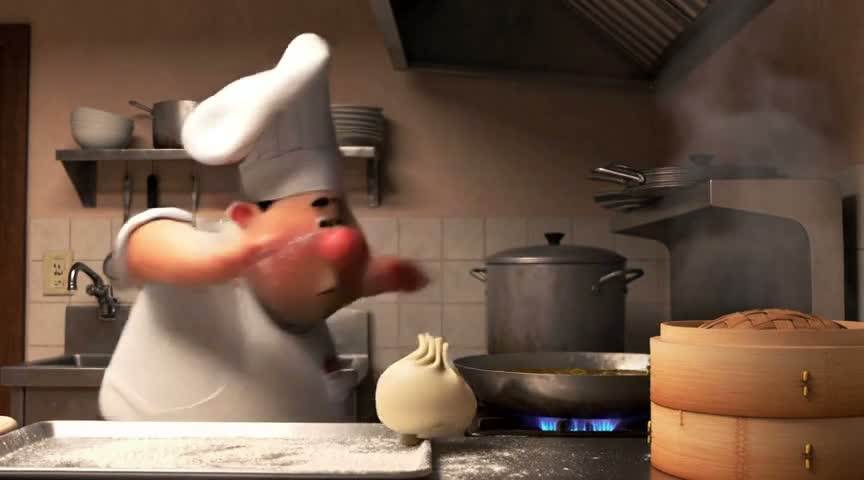
integrated_multimodal_description: [Shot 1] Stylized 3D animation, Pixar-inspired cartoon rendering with a C4D and Octane look, warm subsurface scattering through ears and fingertips and exaggerated squash-and-stretch acting; a three-head-tall cook with a round face, a tall white toque that flops to one side and a flour-dusted apron stands at a stainless counter in a small warm kitchen, rolling dumplings by hand. The counter is dusted white, a bamboo steamer steams on the right, and a shallow pot of broth sits at the burner behind him with visible heat shimmer. The camera holds a static shot at counter height for the first second while he sets one finished dumpling down on a tray in the foreground, presses the seam with two fingers, then turns away to reach for a rolling pin on the shelf behind him, the toque tipping as he turns. At about one and a half seconds the dumpling on the tray presses itself upward, its pleated top gathering like a brow, and two stubby legs of dough push out of its base. It walks to the tray edge in three quick shuffling steps, the tray ringing slightly under each step, and jumps off toward the pot. At about two and a half seconds the cook whips around and lunges, both arms out, and misses clean over the top of it as the dumpling arcs into the broth with a plop. He freezes half-bent over the pot, arms still out. At about three and a half seconds the surface breaks and the dumpling floats back up, cooked, glossy and steaming, bobbing once against the side of the pot. The last second holds completely still on the cook's face as he straightens up slowly, flour on his cheek, the toque now fully flopped over one eye, one eyebrow rising while his mouth stays flat; a single bubble pops on the broth behind him.

overall_soundscape: Warm small-kitchen ambience with a low gas burner hiss and the faint creak of a steaming bamboo basket, the dry shuffle of a flour dusting, three soft doughy footfalls on metal tray, one short airy whoosh as he lunges, a clean heavy plop into broth, then a gentle simmer with one small bubble popping.

non_diegetic_music: A light pizzicato cello figure at a moderate tempo that follows the dumpling's footsteps, drops out completely during the lunge and the plop, and returns on a single dry resolved note as the cook straightens up.
What each part does:
The style words come first. "Stylized 3D animation, Pixar-inspired cartoon rendering…" sets the whole look before anything happens. Put the style at the very start of the description, not buried in the middle.
Timed beats pace the story. "At about one and a half seconds…", "At about two and a half seconds…", "At about three and a half seconds…" — the prompt reads like a shot list with times, so the model can spread the action across the 5 seconds instead of cramming it all at the start.
The soundscape follows the beats in order. Burner hiss, footfalls, whoosh, plop, simmer — each sound matches a moment in the picture, in the same order.
The music follows the action and drops out. "Drops out completely during the lunge and the plop" is what keeps the sound effects audible at the two loudest moments. If you want a sound effect to land, tell the music to get out of the way.
What came back: the Pixar-style cook with the flopping toque, the steamer, the pot, the dumpling on the tray — the style and the scene match the prompt, and the clip holds together across the timed beats.
4 mistakes beginners make
One long sentence with no shots. "A man walking in a city at sunset" gives the model nothing to stage. Break it into a shot: where is the camera, what moves, and when.
Writing "don't". "Don't add text" or "no watermark" doesn't work as a negative — describe the clean scene you want instead.
Writing the prompt in another language. The model reads English best. Write the prompt in English even if the dialogue itself is in another language — the <d> tag carries the language.
Asking for five things in 5 seconds. One subject, one or two actions, one camera move. If the clip needs more, split it into two shots — or two clips.
What it costs
5 seconds at 480p costs 100 credits. New accounts get 1,000 free credits on sign-up — ten 5-second clips to practice with. Longer clips and higher resolutions cost more per second; the studio page shows the price before you generate.
FAQ
Do I have to write the prompt in English?
Yes — the prompt itself should be in English. Spoken lines can be in another language: put the language tag inside the <d> tags, like <d>[en] …</d>, and write the words verbatim.
Do the [Shot 1] and <d> tags work on SheenCloud?
Yes. You paste the whole prompt — tags included — into the text prompt box on the text-to-video studio page. There is nothing else to set up.
What if the video ignores part of my prompt?
Shorten it. Change one thing per try: cut a shot, simplify the action, or move a detail from the picture into the soundscape. The most common fix is removing the least important half of the prompt and running it again.
All three videos in this post were generated on SheenCloud with the exact prompts shown, 5 seconds at 480p, 100 credits each. The prompt structure is adapted from MiniMax's official H3 prompt guide.
2026年11月9日
5 分钟
How to Replace a Person in a Video with AI (No Reshoot)
Upload 1–5 photos of the person you want and the video to change, and AI replaces the person in the video while keeping the scene, motion, and timing. Here is how it works, what to prepare, and when to use it instead of a face swap.